
Mahjong CRM — guide
Mahjong CRM is the working part of the Kōkasoku portal for clubs, countries and admins. This guide explains why it exists and how to use it. Features at a glance →
Why the system exists
Three levels of work
- Level 3 · Clubs. The club head and deputies see their own club: players, their level, equipment and tournaments. Anyone can create a club.
- Level 2 · Countries. The country president and representatives see the whole country and all its clubs, know how to raise the quota, work with clubs, help them, keep the calendar and talk to other organisations.
- Level 1 · Kōkasoku admins. See every country, help representatives and support the whole system.
Level 3 · Clubs
Creating a club
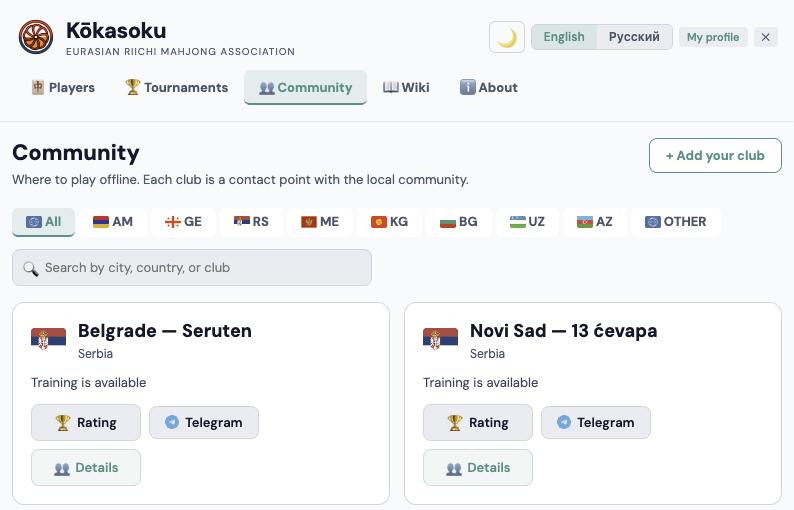
Open Community (kokasoku.com/community) and press “+ Add your club”. Fill in the name, country, city and contacts.
A Kōkasoku admin reviews the request. Once approved, the club appears in Community, you become its head and get access to Mahjong CRM.
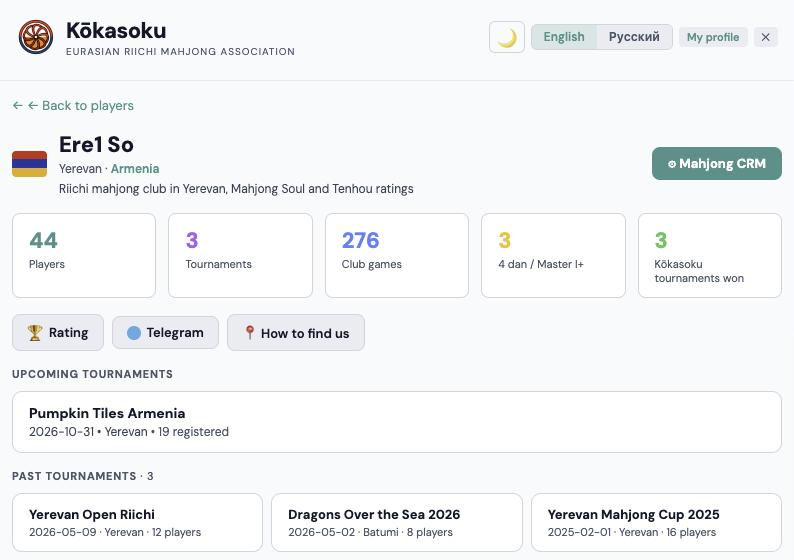
Where the club's Mahjong CRM is
On the club page there is a “⚙ Mahjong CRM” button in the top right. The club head and deputies, country representatives and admins can see it.
The CRM has its own address, /riichi-club/<club>/crm, so you can bookmark it. Without access the address sends you back to the public club page.
Below the buttons the club page lists upcoming and past tournaments of the club and its city.
Player profile: what players fill in themselves
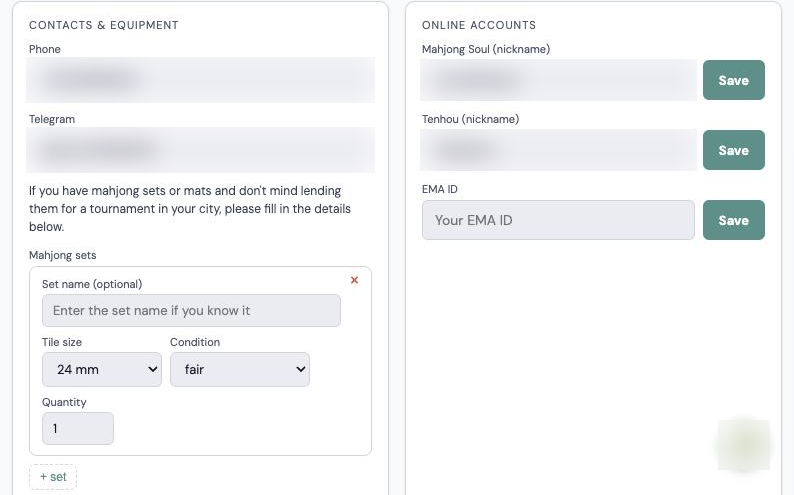
Data in the CRM does not only come from club and country leaders — players add it themselves in their profile settings (kokasoku.com/profile):
- Account: name in Cyrillic and Latin, country, club and city. Choosing a club adds the player to it.
- Online accounts: Mahjong Soul and Tenhou nicknames — the portal pulls their ranks, so club and country tables show the player's level. The EMA number goes here too.
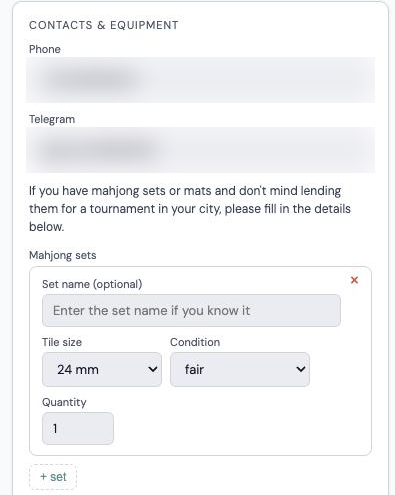
- Contacts & equipment: phone and Telegram, sets (size, name, condition), mats and photos. All of it goes straight into the club inventory.
So the first thing to ask club players is to sign up and fill in their profile.
If your club does not usually work that closely, don't worry. When players register for tournaments they add their contacts themselves and are usually happy to say which sets and mats they have. This way the portal gathers what the club needs gradually and naturally.
Club players
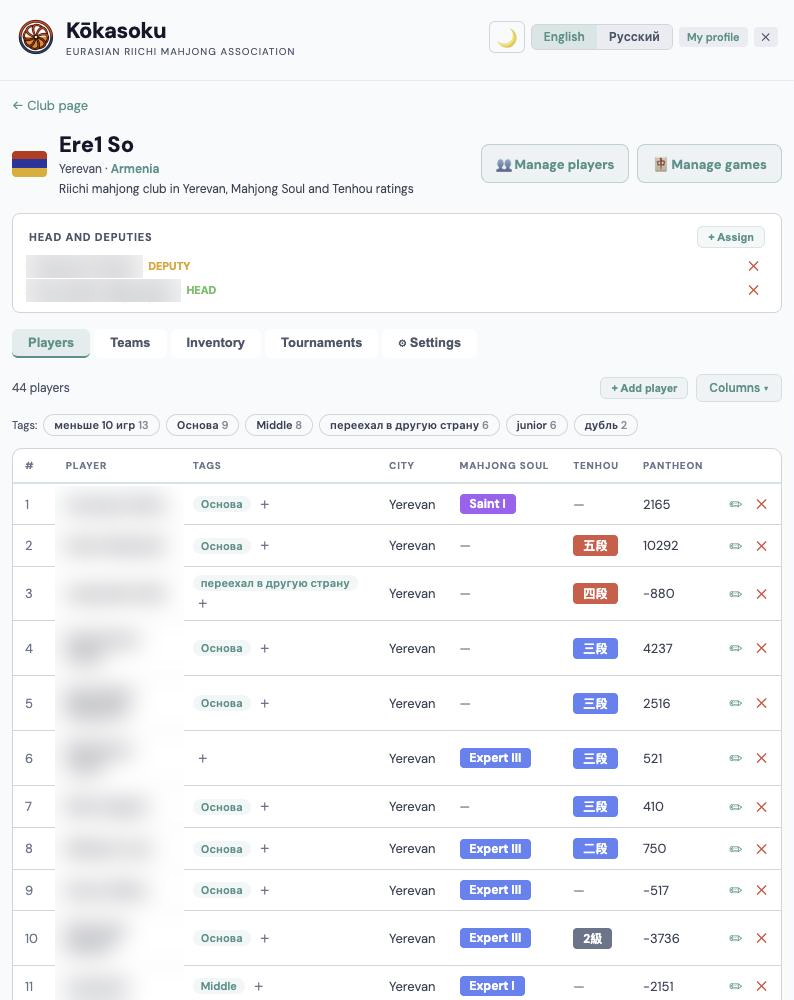
The Players tab is the club roster: club rating and games from Pantheon, Mahjong Soul and Tenhou ranks, tags and contacts.
It shows who is improving, who has not come for a while and who is ready for a tournament. You can add a player to the club by hand.
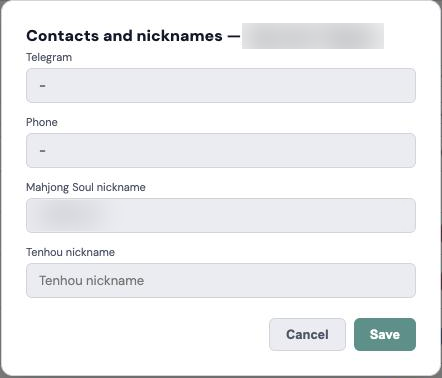
The ✏ button opens a simple “Contacts and nicknames” card: Telegram, phone and Mahjong Soul and Tenhou nicknames. Fill it in for a player who has not done it themselves.
Tags are up to the club — use whatever works for you. The Armenian club, for example, uses tags to split players by level (“core”, “middle”, “junior”) and to mark those who have left the country. You can filter the table by tag.
The ✕ button removes a player from the club. Removing a player from the country rating is up to the country representatives: it is a more sensitive matter, so leave that decision to them.
Club settings: the public page
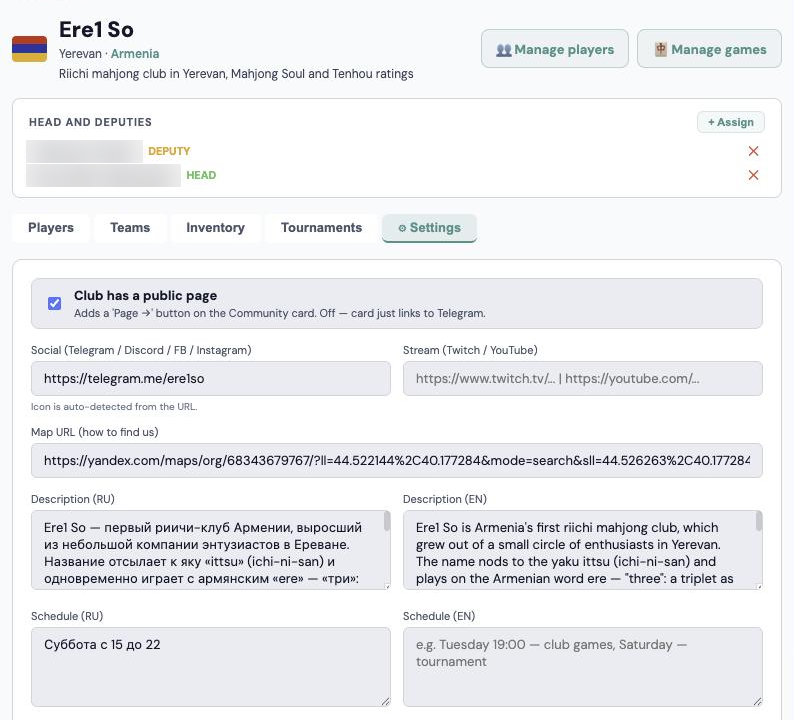
The top of the Settings tab controls what visitors see on the club's public page (e.g. kokasoku.com/riichi-club/ere1so) and its card in Community:
- “Club has a public page” adds a “Page →” button to the Community card. Without it the card only links to Telegram.
- Social link (Telegram, Discord, Facebook, Instagram) — a button on the club page and card; the icon is picked from the link.
- Stream (Twitch, YouTube) — if the club streams its games.
- Map link — the “How to find us” button.
- Description (RU and EN) — the club's text on its page in Russian and English.
- Schedule (RU and EN) — when the club plays; if the English field is empty, the Russian one is shown.
Above the tabs is the “Head and deputies” block. With “+ Assign” the club head or a deputy (as well as a country representative or an admin) can add a deputy or change the head.
Pantheon ratings and new players
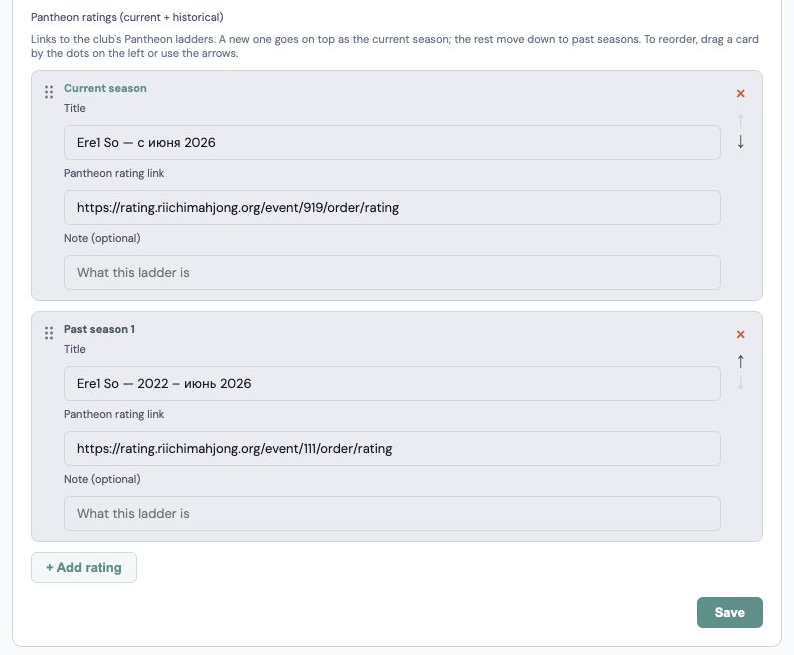
In Settings, add the links to the club's Pantheon ratings. A new rating goes on top and becomes the “current season”; drag to reorder.
Once a day the portal pulls games from Pantheon. New players who reach the country threshold (for example 4 games in Serbia) are added automatically, with a card named after their Pantheon nickname.
The CRM header has “Manage players” and “Manage games” buttons that open the current season in Pantheon — handy on a phone at the club.
If your club keeps its rating in its own or another system, write to the portal admins or your country representatives and we will discuss adding it. It is usually not hard. For easy work with the data, though, we recommend Pantheon: the portal supports it out of the box.
Equipment
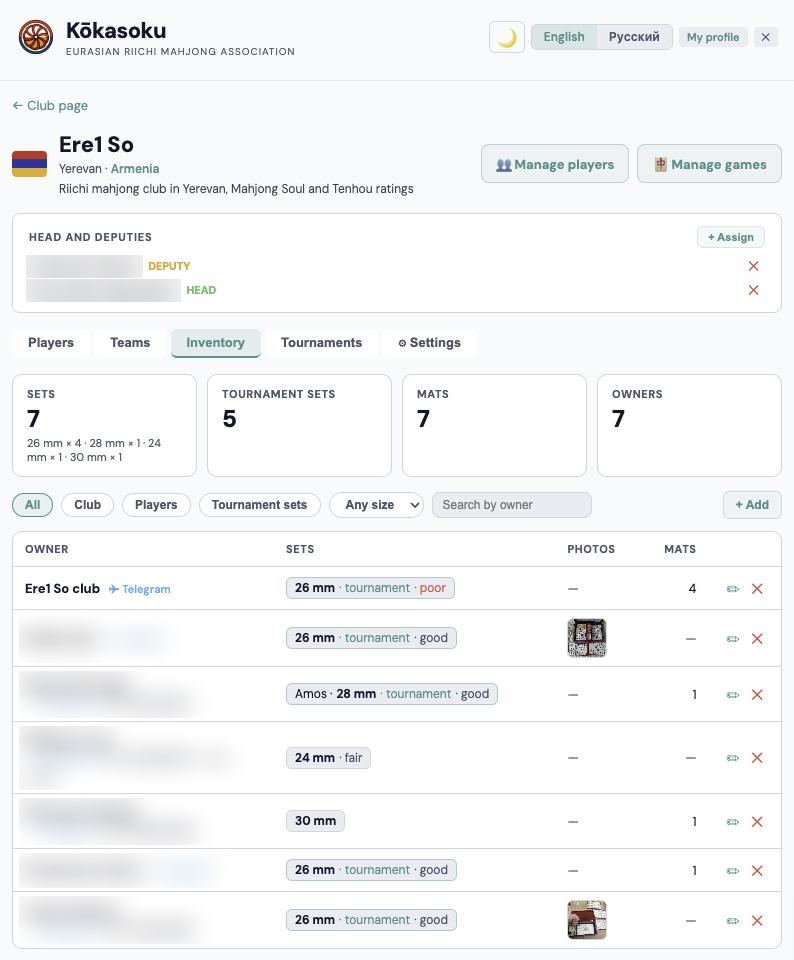
The Equipment tab lists the sets and mats club members own: set size and name, mat type (junk mat with rails, custom, flat), photos and the owner's contacts. Totals and a filter are at the top.
Players fill in “Contacts & equipment” in their profile settings — it goes straight into the club inventory and moves with the player if they change clubs. That makes collecting sets for a tournament easy.
The club can also add a specific player's sets itself: “+ Add” → owner “Player” → find the player by name. If the club owns sets or mats, choose “Club” as the owner — they go into the club's row and the “Club” filter.
Creating a tournament
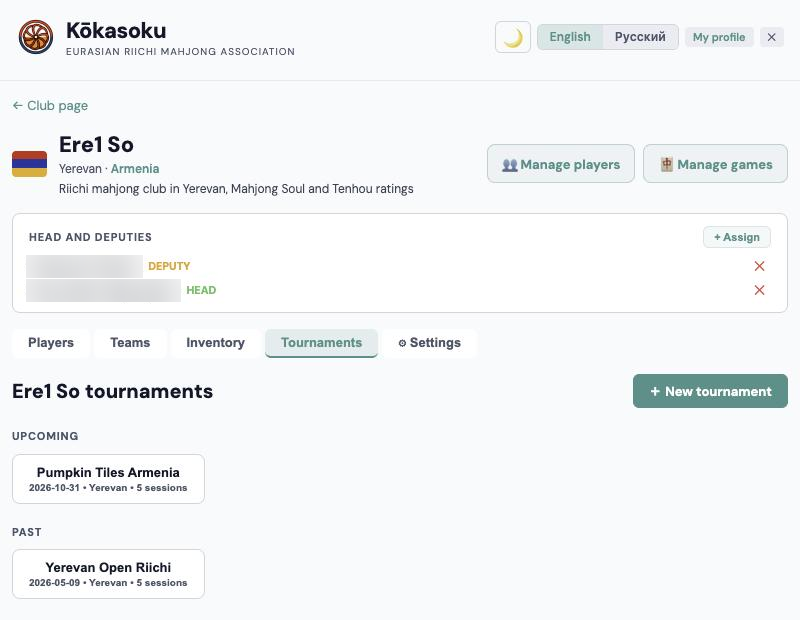
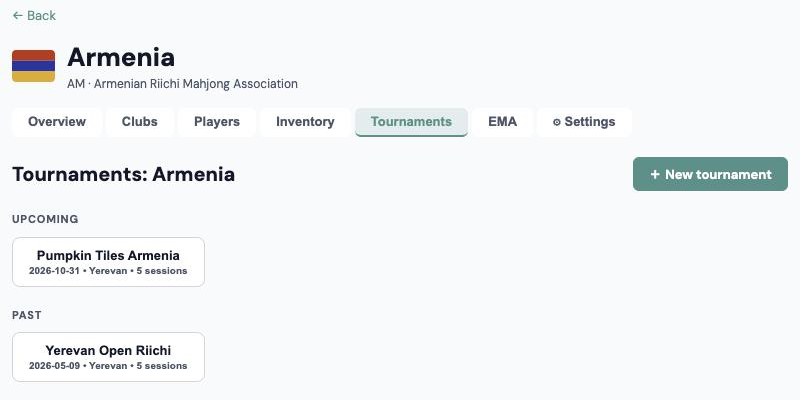
The Tournaments tab holds the events of the club and its city; upcoming and past ones are listed separately. “+ New tournament” opens the form. Every field has a hint.
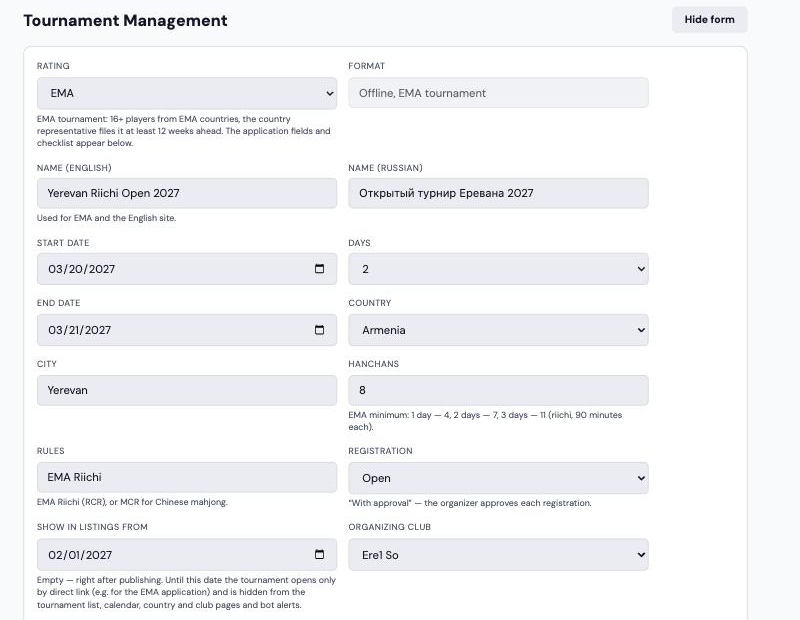
- Rating is the first field. Kōkasoku by default (12+ players, the country representative approves publication). EMA or unrated can be chosen. For EMA the format is set automatically — “offline, EMA tournament” — and the EMA application, checklist and item-by-item description appear below (next section).
- Name in Latin and Cyrillic — in any language (English, Serbian, German…). The Latin name goes to the EMA and the English site; if the Cyrillic one is empty, the Latin one is shown.
- Start date and number of days; a multi-day event gets its end date automatically.
- Country, city (in Latin letters), number of hanchans and rules (EMA Riichi or MCR). For EMA the hanchans field shows the minimum: 1 day — 4, 2 days — 7, 3 days — 11.
- Registration: open or “with approval”, where the organiser approves each request.
- “Show in listings from” is a hidden listing. Until this date a published tournament opens only by direct link (you can give it to the EMA with the application) and is hidden from the tournament list, calendar, country and club pages, the sitemap and bot alerts. On that day it appears everywhere by itself and the bot sends the announcement to subscribers. Empty means right after publishing.
- Organising club.
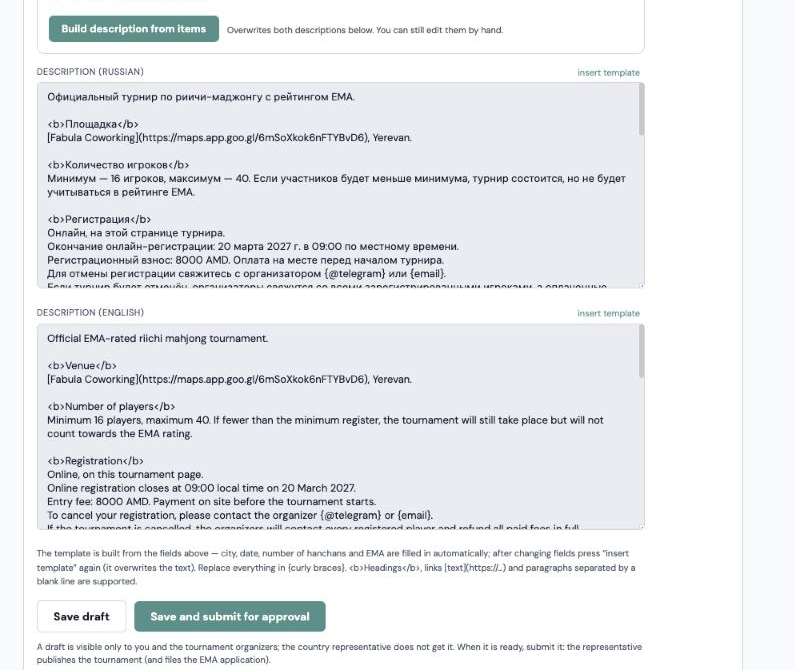
- Description in Russian and English. For an EMA event, fill in the “item by item” description and press “Build description from items”; for others use “insert template” and replace everything in {curly braces}. <b>Headings</b> and links [text](https://…) work.
There are two buttons at the bottom. “Save draft” creates the tournament, visible only to its organisers; the country representative does not get it. “Save and submit for approval” sends it to the country representative (with a Telegram bot notification if they linked Telegram).
Minimum field (as of October 2026): to count for the Kōkasoku rating — 12 players; to count for the EMA ranking — 16 players from EMA member countries.
Preparing the EMA application
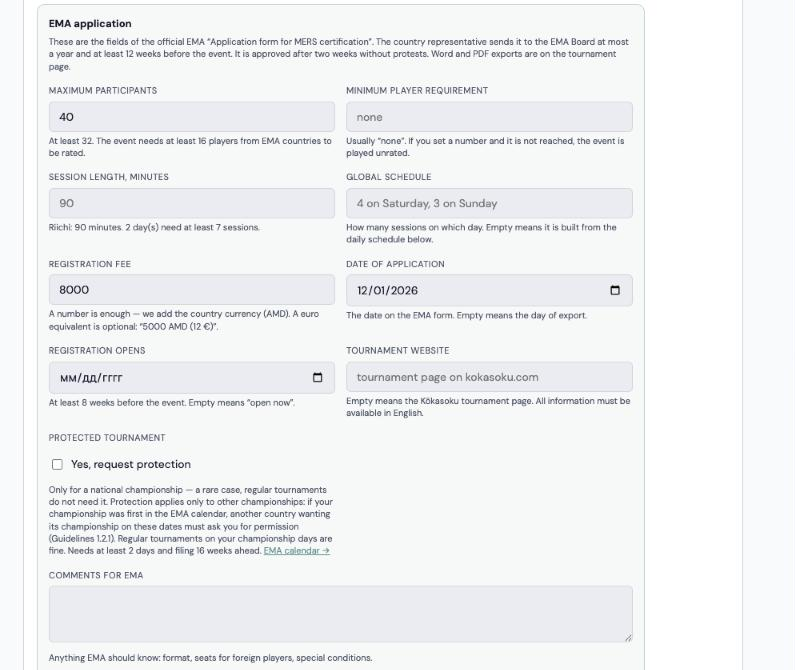
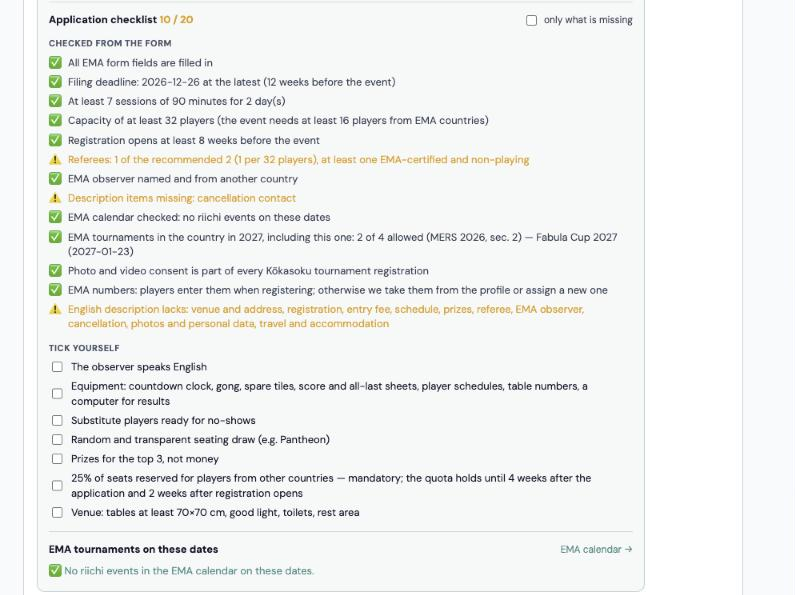
When the EMA rating is selected, the tournament form becomes the EMA application. The idea is simple: ask everything in detail, and whatever the portal already knows, it fills in and checks itself.
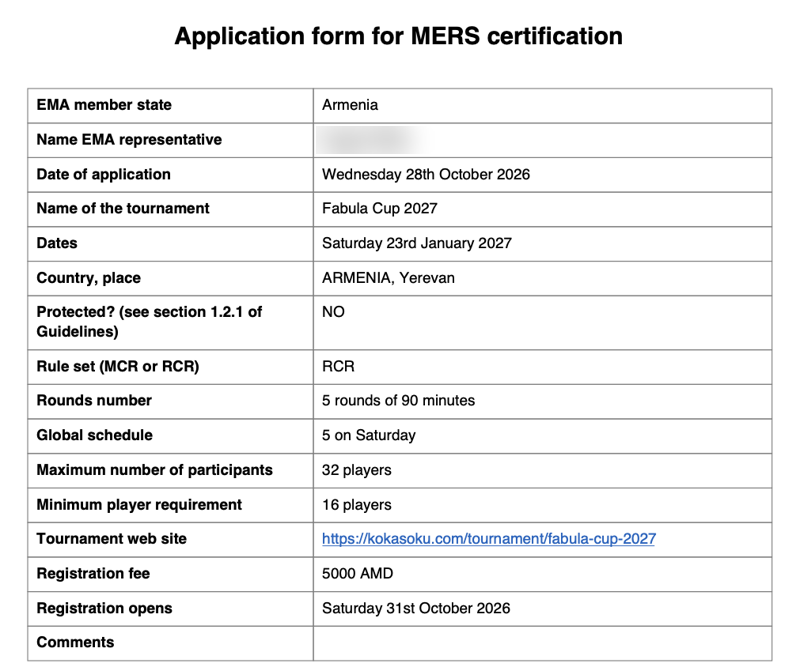
- EMA application — the fields of the official “Application form for MERS certification”: maximum players (at least 32), minimum players (usually none), session length, daily schedule (built from the schedule below), fee (a number is enough — the country currency is added), application date (empty means today), registration opening (at least 8 weeks ahead), website (empty means the Kōkasoku tournament page) and comments for the EMA.
- “Protected tournament” is only for a national championship, a rare case. Protection applies only to other championships: if your championship was first in the EMA calendar, another country wanting its championship on those dates must ask you for permission. Regular tournaments on championship days are fine. Needs at least 2 days and filing 16 weeks ahead.
- Checklist with a counter. The portal checks by itself: all fields filled, the filing deadline (at least 12 weeks and at most a year ahead), minimum sessions for the number of days, capacity, registration opening, referees (1 per 32 players, at least one EMA-certified and non-playing), the observer (from another country), description items, the EMA calendar on these dates, the limit of 4 riichi EMA events per country per calendar year (MERS 2026, sec. 2; the European Championship does not count) and the sections of the English description. Photo consent and EMA numbers are ticked straight away: the portal handles them for every tournament. You tick only what cannot be checked: the observer's English, equipment, substitutes, seating, non-cash prizes, 25% of seats for foreign players, the venue. “Only what is missing” hides what is done.
- EMA tournaments on these dates, at the end of the application: riichi events from the EMA calendar that overlap your days, with a link to the EMA calendar. Overlaps do not matter for a regular tournament; a protected championship overlapping another championship needs coordination.
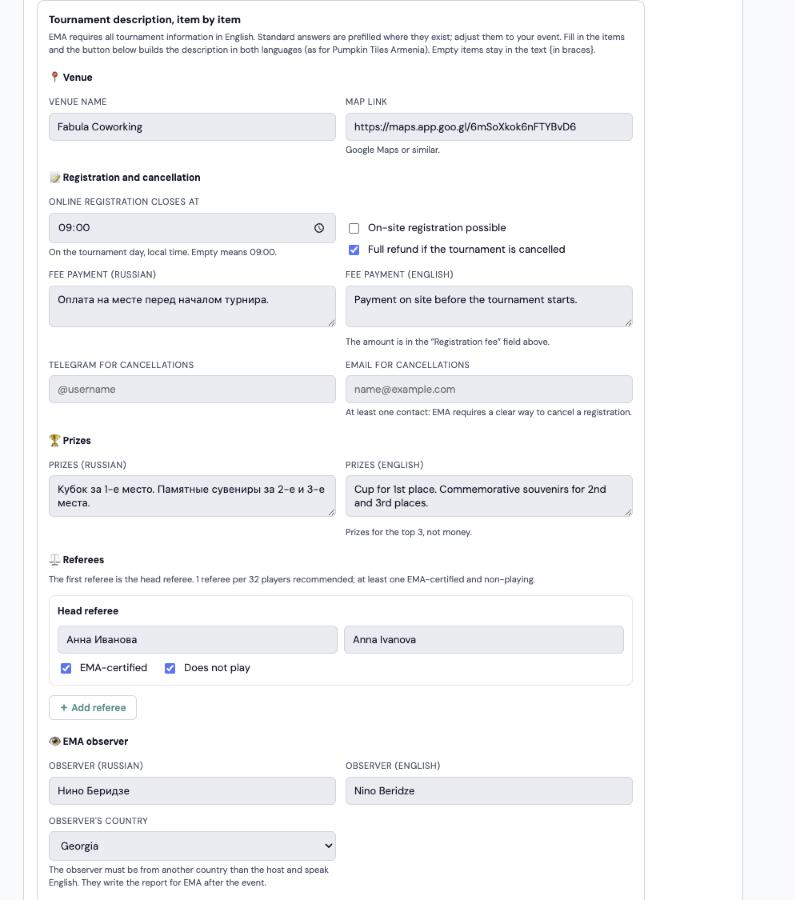
The item-by-item description is what the EMA wants to see on the tournament website in English. Each item is a separate field in Russian and English; where a standard answer exists (pay on site, prizes, food, times) it is prefilled — edit it or restore it with “↺ default”.
- Venue: name and map link.
- Registration and cancellation: when online registration closes, on-site registration, refunds if cancelled, how to pay, Telegram and email for cancellations.
- Prizes — for the top 3, not money.
- Referees as a list: “+ Add referee”, each with their own “EMA-certified” and “does not play” ticks. The first referee is the head referee.
- EMA observer: name in Cyrillic and Latin and country — it must differ from the host country.
- Food, getting there and where to stay.
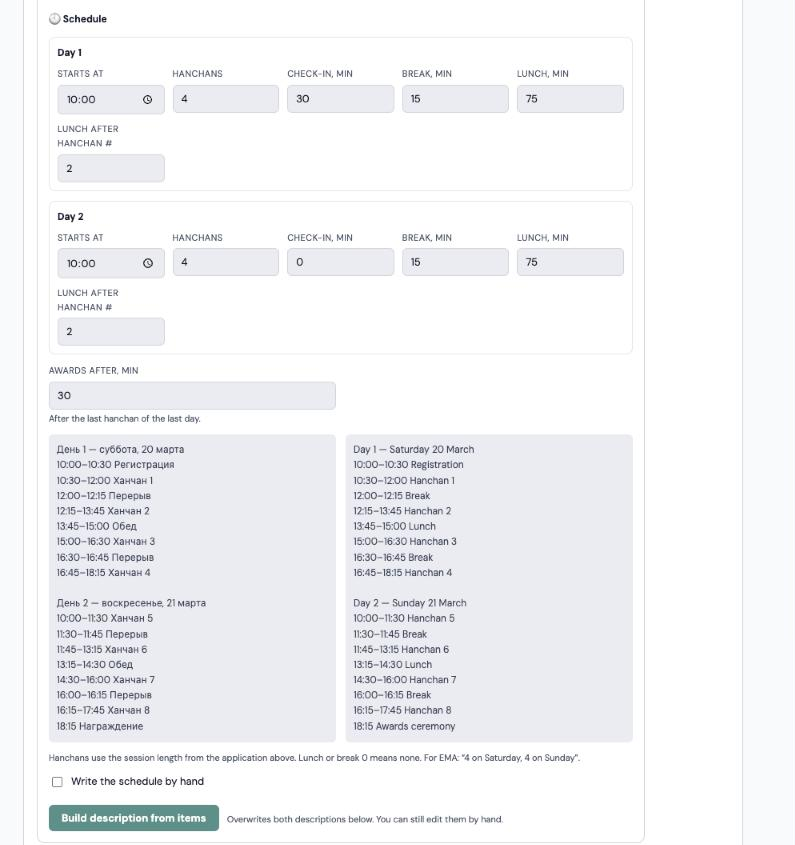
- Schedule per day: each day has its own start, number of hanchans, check-in, break and lunch (after which hanchan). The finished schedule is shown in both languages and the tournament's hanchan count updates itself. For special cases there is “Write the schedule by hand”.
“Build description from items” writes the tournament description in both languages following the Pumpkin Tiles Armenia example; empty items stay in the text {in braces}.
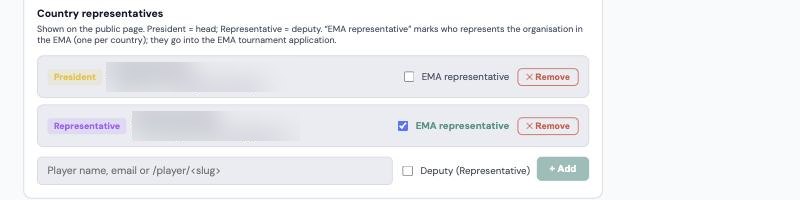
The finished EMA form downloads from the tournament page with “⬇ Word” and “⬇ PDF”: the tournament link in it is clickable and dates use the EMA format. The EMA representative on the form is whoever is ticked “EMA representative” in the country settings (one per country); if nobody is ticked, the president. The representative sends the form to the EMA.
You can also fill all of this in with the AI assistant via MCP: it shows what is missing, asks questions in your language, translates the answers into English and saves after your confirmation. Regular players cannot work with applications.
Publishing a tournament and its EMA status
A new tournament is saved as a draft: only its organisers see it, and the country representative does not get it. When it is ready, the organiser clicks “Submit for approval” (or “Save and submit” right in the form). Until it is published it can go “Back to draft”. An EMA tournament cannot be submitted while the checklist has ⛔ items.
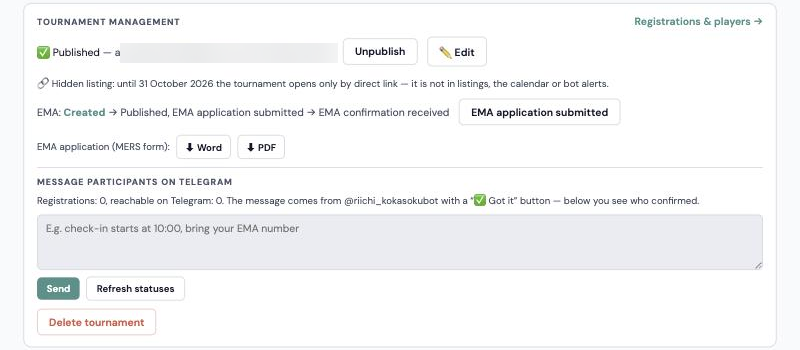
The country representative approves a submitted tournament with “Approve & publish” on the tournament page (they get a Telegram notification from @riichi_kokasokubot about tournaments awaiting approval). Then registration opens, the tournament appears in the lists and the bot announces it to subscribers. If “Show in listings from” is set, until that date the tournament opens only by direct link — the panel shows a “🔗 Hidden listing” line.
An EMA tournament page has “⬇ Word” and “⬇ PDF” buttons: the official EMA “Application form for MERS certification”, filled in from the tournament data. The country representative sends it to the EMA.
A tournament can be edited (“✏️ Edit”) and unpublished. An unpublished tournament is visible only to admins, representatives of the host country, the organising club's head and deputies.
For an EMA tournament the order is:
- Country representatives submit the application to the EMA at least 12 weeks before the event — so the representative must approve publication before that. If the deadline is missed, the portal warns that EMA status is no longer possible.
- After submitting, the representative sets “Published, EMA application submitted” — the site marks the tournament as pending.
- The EMA usually answers in about 2 weeks. Then the representative sets “EMA confirmation received” and the site shows “EMA · Confirmed”.
Every status change asks “Are you sure?”, so a stray click cannot change it.
Registrations and players
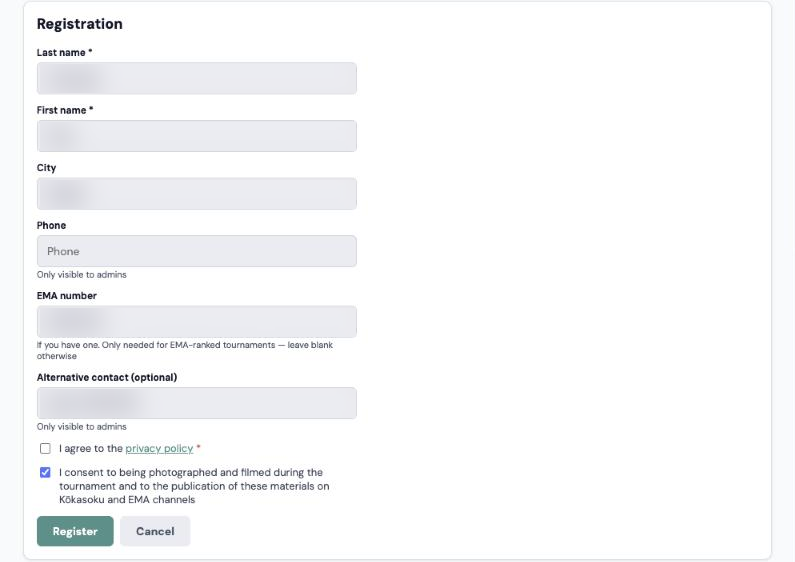
Every tournament's registration form has a photo and video consent tick, on by default. If a player unticks it, they are still registered and the organiser sees a “📷✕ No photos” line in the registrations. If the player linked Telegram, their @username is filled in as the contact.
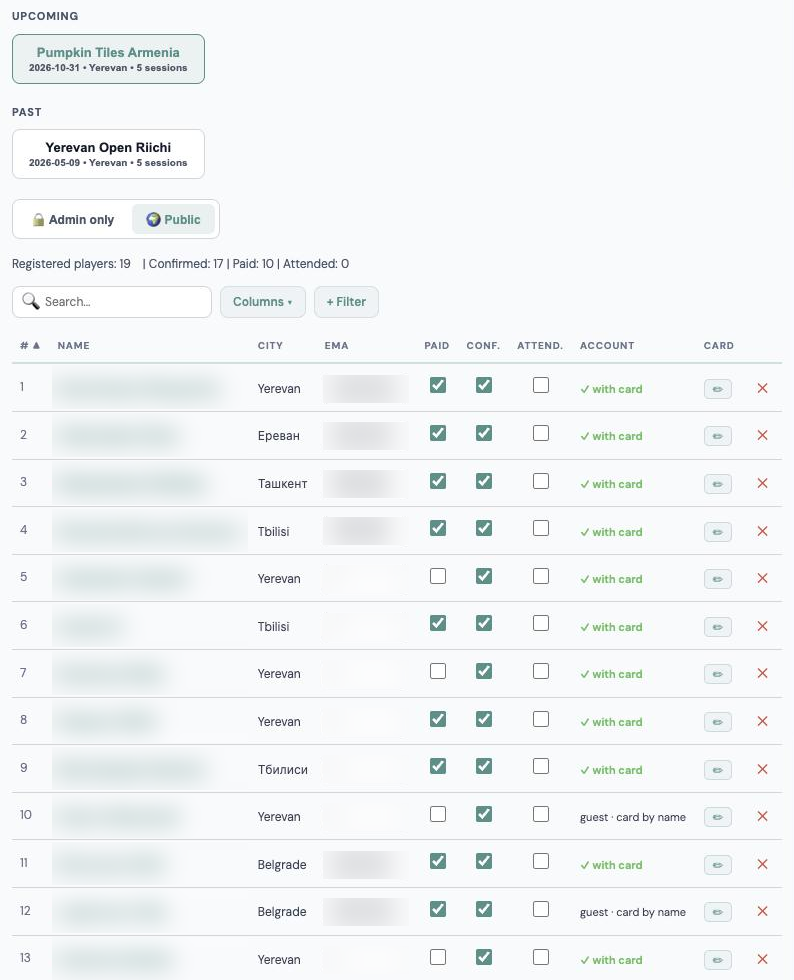
Click a tournament in the tab to open the registrations table: confirmation, the “Paid” and “Attended” marks, the EMA number and the player card. The organiser gets a Telegram bot notification about every new registration.
“Message participants on Telegram” on the tournament page sends a message to every registered player with linked Telegram (for now messages go out only this way and through the country — see “Telegram bot messages”). It comes from the bot with a “✅ Got it” button; the history shows each person's status: delivered, confirmed, failed or no Telegram.
The portal does not do seating yet: for now every club seats players in Pantheon, which offers several seating options. If your club needs a different format, write to us and we will work out seating on the portal.
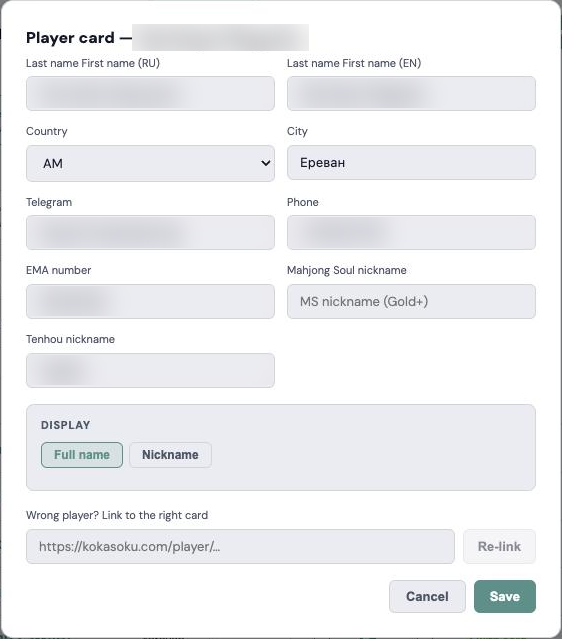
The ✏ button in the Card column opens the player card: fill in contacts, the EMA number and nicknames by hand. If the portal did not find the right card — say, the player changed their name — paste a link to the correct card under “Wrong player?” and press “Re-link”.
Pantheon nicks: adding players to the event quickly
On the tournament page, next to the number of players, there is a “🏷 Pantheon nicks ↗” button. It opens, in a new tab, the list of participants with their Pantheon nicks. The tournament organisers, the organising club's leaders, the country representative and admins see it.
- Click a nick to copy it, then paste it into Pantheon. “Copy all nicks” copies the whole list at once; if the event is set, only those not in it yet.
- Paste the Pantheon event link into the “Pantheon event” field at the top and press “Save”. Each participant then gets ✅ (already in the event) or ⬜ (not yet) and an “N of M in the event” counter. The ticks refresh by themselves every 10 seconds; “🔄 Check in Pantheon” refreshes at once.
- The nick comes from the player card, the account or a name match; matches by name are marked “please check”. If a player is not in Pantheon or the nick is wrong, press ✎ and type the nick by hand — before, during or after the tournament.
- At the bottom you see players who are already in the event but were not matched to a registration.
Level 2 · Countries
The country page
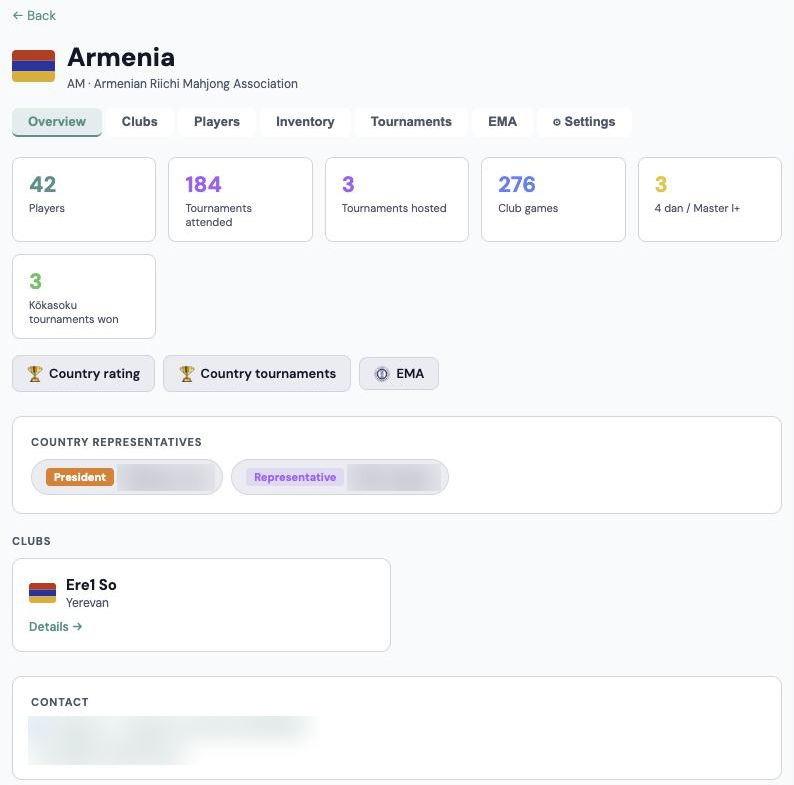
Representatives work on their country page, kokasoku.com/country/<country>. They get extra tabs: Overview, Clubs, Players, Equipment, Tournaments, EMA, Messages, System and Settings.
Clubs and players of the country
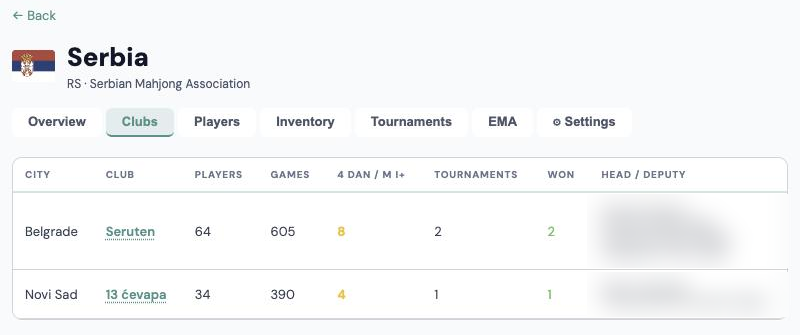
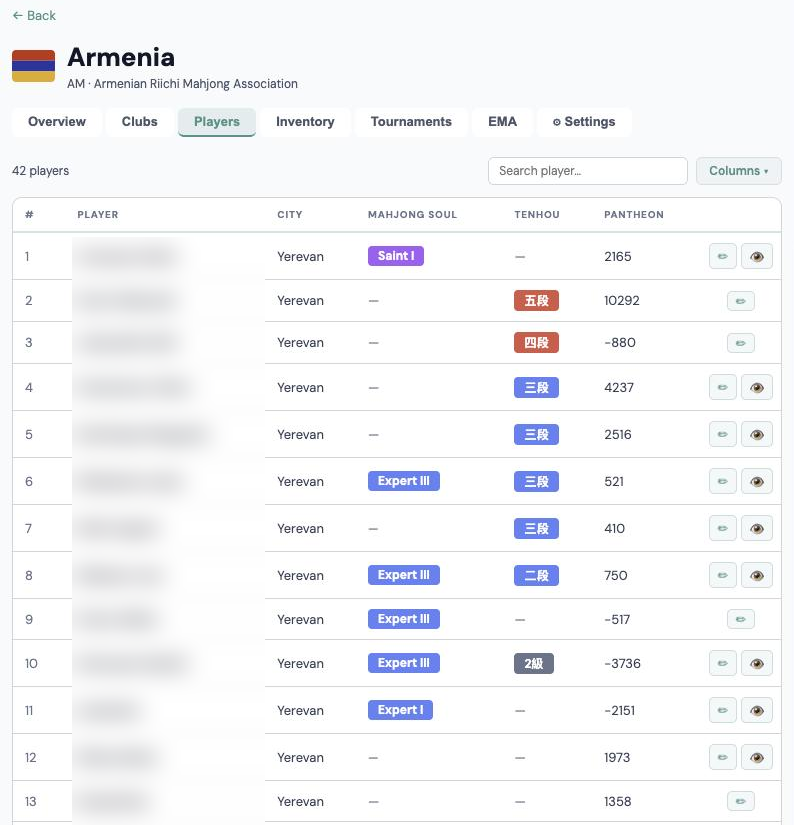
Clubs lists every club with its stats; a row opens the club and its CRM. Players holds all player cards of the country, including the EMA number.
If a club has trouble with its head (left, not responding), the country representative can open the club CRM and help: update the roster and ratings, and appoint a new head through an admin.
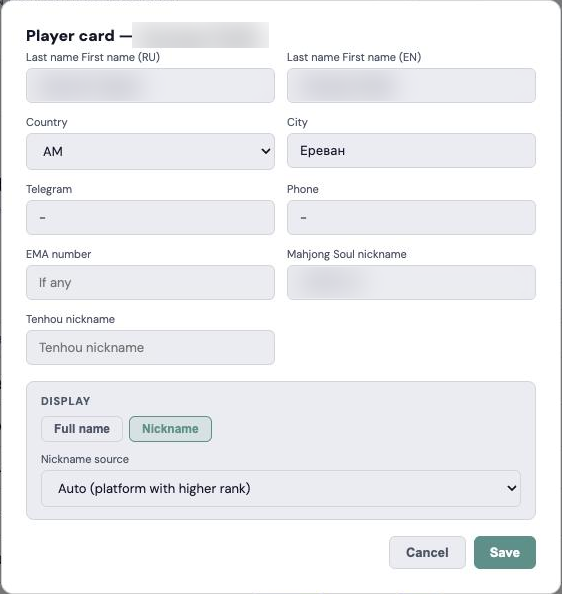
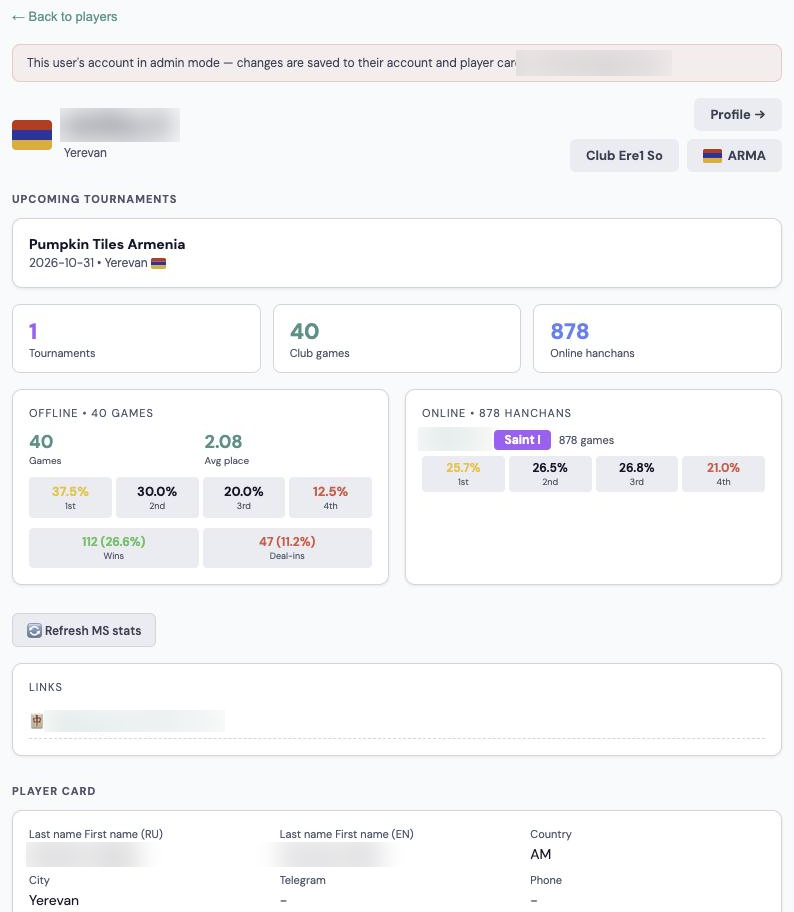
In Players, ✏ opens the full player card: name in Cyrillic and Latin, country, city, contacts, EMA number, nicknames and whether to show the name or the nickname. 👁 opens the player's profile as the player sees it; changes there are saved to their account. Admins and country representatives can do this for players of their own country.
EMA and quotas
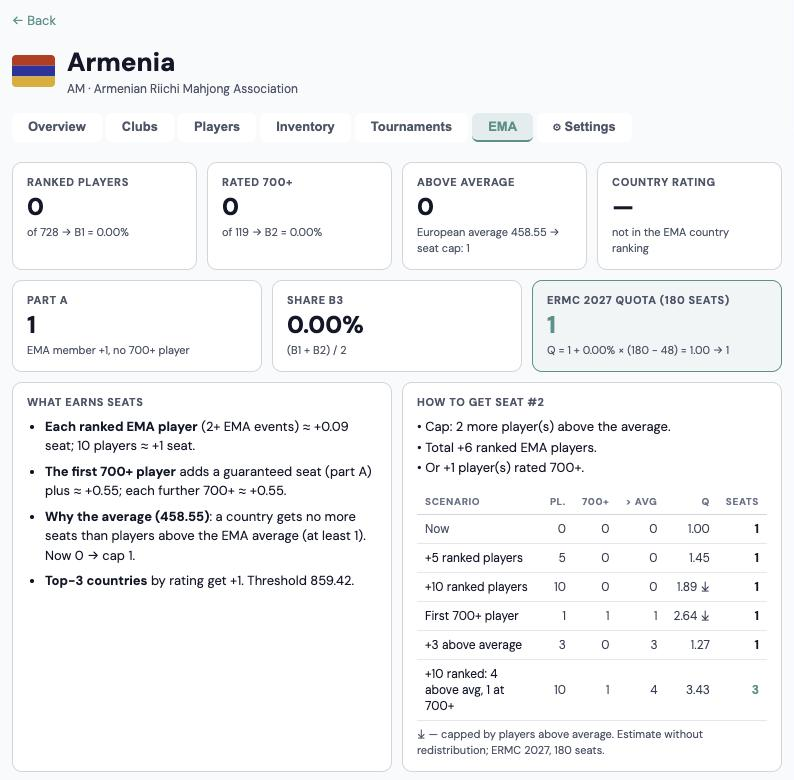
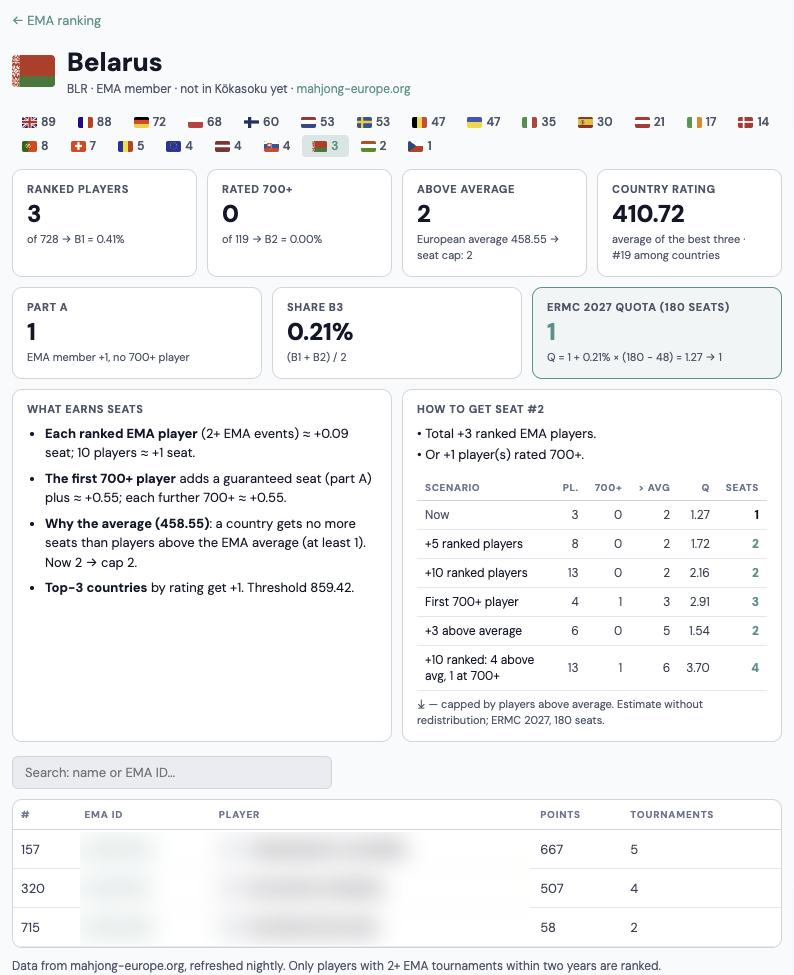
The EMA tab shows everything a country's championship seats depend on: players in the EMA ranking, players rated 700+, players above the average, the country rating, part A, share B3 and the quota forecast for the next major event — the European (ERMC) or World (WRC) Riichi Championship. Currently that is ERMC 2027.
- A player enters the EMA ranking after 2 EMA events. Each ranked player ≈ +0.09 seat: 10 players ≈ +1 seat.
- The first player rated 700+ adds a seat at once; each 700+ player adds another ≈ 0.55.
- A country gets no more seats than it has players above the EMA average (≈ 458). That is the cap.
- To reach 700 a player needs about 5 EMA events within 12 months: missing ones count as zeros.
EMA data refreshes automatically every night from mahjong-europe.org. When the average, the number of 700+ players or the seat value of a player change, the figures on the country's EMA tab are recalculated straight away. The values in the list above are as of writing; the tab always shows the current ones.
Below is “How to get the next seat”, worked out for your country, with a table of scenarios. Use it to set clear goals for clubs.
Tournaments and the calendar
The Tournaments tab gathers all the country's events. An EMA event has to be submitted to the EMA at least 12 weeks ahead; championship quotas use the ranking at a cut-off date, so plan the calendar back from it.
The calendar and results of EMA events across Europe are in the EMA section (for admins) and behind the EMA tab.
EMA reports
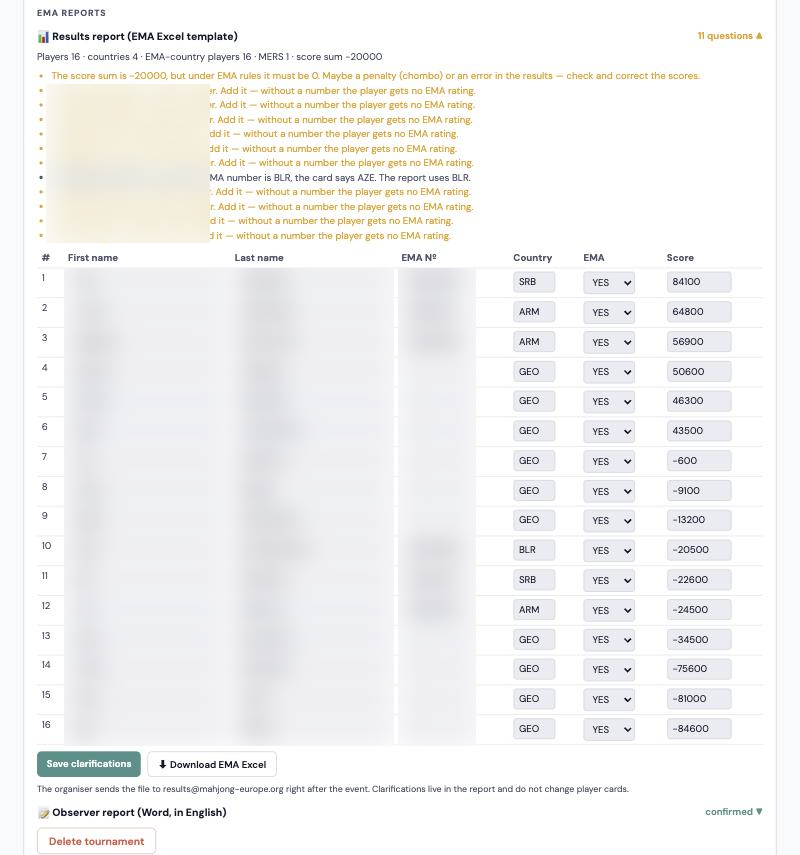
After an EMA tournament, its page gets an “EMA reports” block under Tournament management, visible to the organiser, the club head and the country representative.
- Results report. The portal builds the table in EMA's template format itself: places, Latin names, EMA numbers, scores, country and “EMA member”. Anything doubtful becomes a question: no EMA number, unclear name order, score sum not 0, country by EMA number differs from the card. Clarifications go straight into the table and do not change player cards. If the score sum is below zero by exactly 20,000 per chombo, that is not an error: under the rules the penalty is not given to other players, and the portal shows it as a note rather than a question. The organiser sends the finished Excel to results@mahjong-europe.org right after the event.
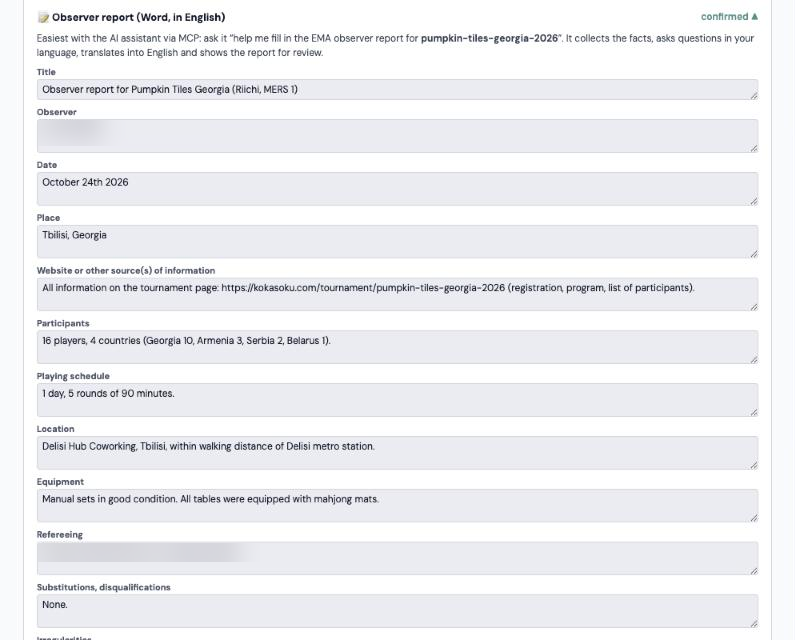
- Observer report. The portal fills in the technical part itself: dates, place, rules and MERS weight, schedule, participants and countries, referees and prizes. The rest is easiest with the AI assistant: it asks questions in your language, translates the answers into English and shows the report for review. The final report downloads as a Word file.
Questions in the report are shown in the site language. EMA numbers for players are requested by the country federation in advance — before the tournament. A player without a number stays in the table in their place but gets no EMA rating. New players can be given a number in the country's Players tab or with “🔢 Assign EMA numbers…” in the results report: the portal shows the plan — who gets which next free number of their country — and after confirmation saves the numbers to the player cards. Numbers are given only to players of Kōkasoku countries; who assigned a number, when and why is shown on the System tab.
Telegram bot messages
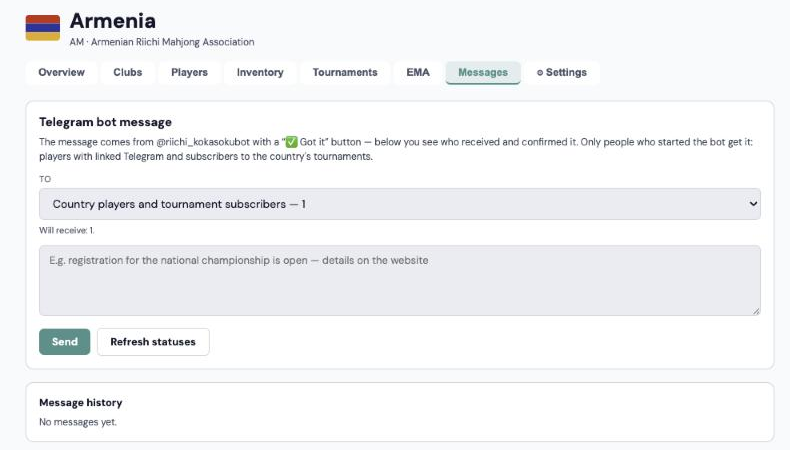
For now, messages go out only two ways: through the country (the “Messages” tab for country representatives) or to a tournament's registered players (“Message participants on Telegram” on the tournament page for the organiser). Clubs do not send their own messages yet.
The “Messages” tab on the country page sends a message through the @riichi_kokasokubot bot. Recipients:
- Country players and subscribers to its tournaments — both lists without duplicates.
- Country players with linked Telegram — the country comes from the player card, otherwise from the account.
- Subscribers to the country's tournaments — people who chose this country or “all countries” in the bot.
- Tournament participants — players registered for any tournament of this country.
You see how many people will get the message, and the portal asks for confirmation before sending. The message comes with a “✅ Got it” button; the history shows each recipient's status: delivered, confirmed, failed, bot blocked or no Telegram.
Only people who started the bot themselves get messages: players link Telegram in their profile or sign in with Telegram, and anyone can subscribe to tournaments in the bot with /subscribe. The bot does not answer messages — for any question it suggests contacting the organiser.
System: the player card change log
The System tab on the country page is a log of every change to the country's player cards: when, which player, which field, “before → after”, who changed it and where.
- It is recorded automatically on every edit: a player in their own profile, the player card (✏), the club's Mahjong CRM, linking Pantheon or Telegram, assigning an EMA number. “System” means no person was involved, e.g. the Pantheon sync.
- EMA numbers show the reason: the federation list, a tournament report (with a link to the tournament) or the Players tab.
- If a player moved to another country, the entry shows in both countries' logs.
- Search by player or author and the field filter quickly show who changed, say, an EMA number or a name.
Country representatives and admins see the log. Entries cannot be deleted or edited — that is the point of it.
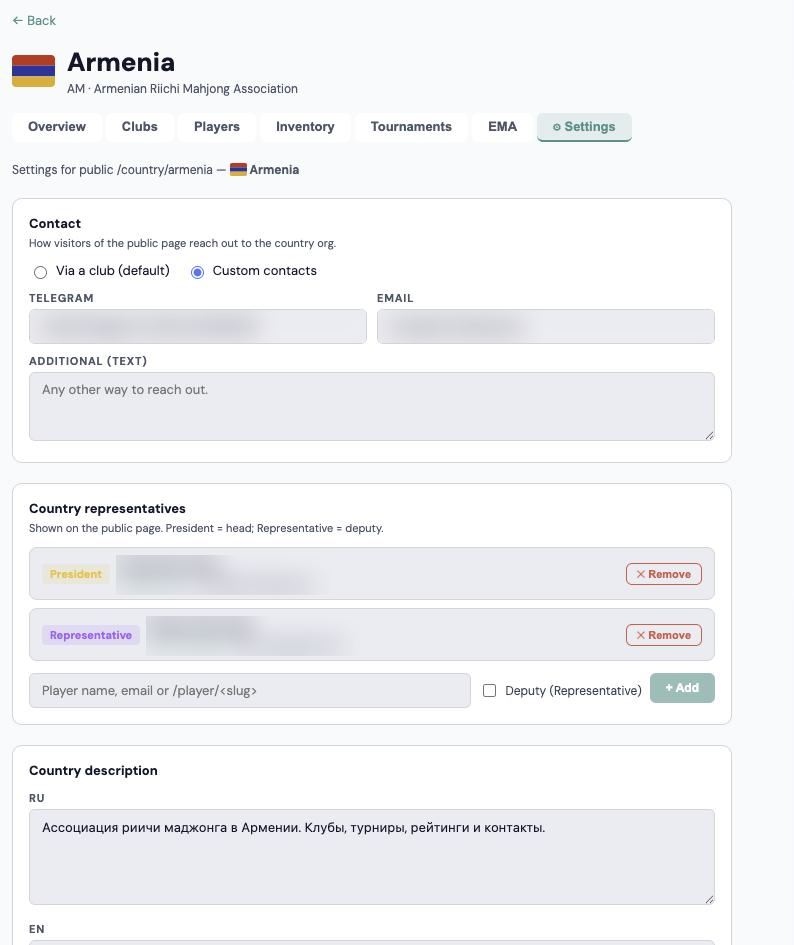
Country settings
Country description, social links, contacts (via a club or your own), the minimum club games for the rating, the country code in EMA numbers and the list of representatives: president and representatives. The “EMA representative” tick marks who the organisation appointed to represent it in the EMA (one per country) — they go into the EMA tournament application.
Level 1 · Admins
What admins have
Kōkasoku admins have a slightly wider set of tools than clubs and countries, plus access to sections still in development: we try new things there before opening them to everyone. The EMA section below is one example.
All countries
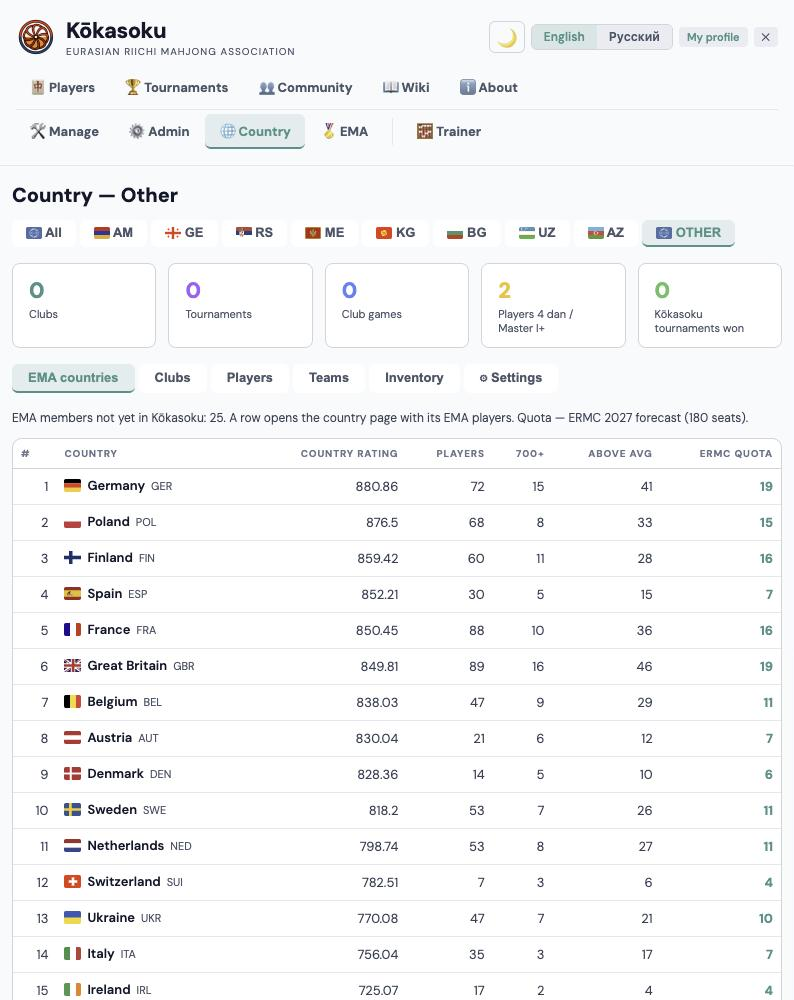
The admin Country section shows all countries at once and each one separately. “Other” holds clubs outside Kōkasoku countries and an “EMA countries” tab: EMA members not yet in the association, each with a ready country page so a new country can join quickly.
A prepared country page — e.g. kokasoku.com/country/belarus — shows its EMA quota figures, the “how to get the next seat” hints and the EMA ranking of its players. When the country joins Kōkasoku, all of it is already in place.
The EMA section
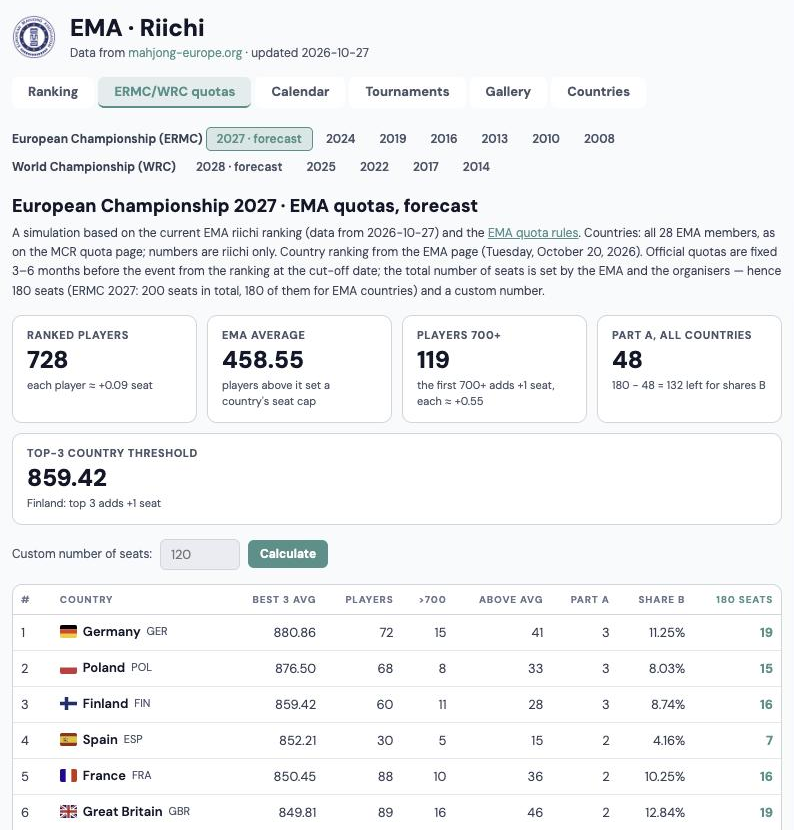
The EMA ranking with a page for every country, ERMC/WRC quotas (forecast and past championships), calendar, tournaments, gallery and countries. Data from mahjong-europe.org refreshes every night.
Telegram bot
The admin panel has a “Telegram bot” tab with its own address: kokasoku.com/admin-panel?tab=telegram. It shows how many people started the bot, linked an account, subscribed to tournaments or blocked the bot, plus the number of messages and confirmations. Below is everyone who started the bot: Telegram link, player card on the site, country, alerts and date.
Support: who to ask
Support works in levels — a question goes up only if it was not solved where it started:
- Player → club leader. Questions inside the club (profile, player card, equipment, club tournament) are handled by the club head or a deputy — they are the first line of support.
- Club leader → country representatives. If the club cannot solve it, it turns to its country's president or representative.
- Country representatives → the association and admins. If the country lacks the rights or experience, representatives discuss it with other association members or write to the Kōkasoku admins directly.
If the club's country has no representative yet, that is fine: after the club registers, the admins will get in touch with it anyway. Admins approve clubs and tournaments and appoint country representatives; contacts are on the About page.
AI assistant (MCP)beta
MCP is a way to connect an AI assistant (Claude, ChatGPT, Codex) to the portal. You add a “connector” with the address kokasoku.com/mcp to your assistant and sign in with your Kōkasoku account. Then you can talk to the assistant about portal data in plain language: it finds players, clubs, tournaments and the rating itself and, if needed, makes changes.
The AI acts strictly on your behalf and with your rights: whatever you cannot do on the site, it cannot do either. Every change goes through the same checks as on the portal.
This section is in beta. For now the connection is shown in profile settings only to admins, and the feature set will grow. EMA data (quotas, 700+ players) is not in MCP yet — to discuss quotas, take the figures from the country's EMA tab.
What the AI can do depending on your role
- Player (any registered user — MCP is not available without an account) — read the Kōkasoku rating, players, clubs, countries, tournaments and their participants; edit your own profile (name, city, country, club, Mahjong Soul and Tenhou nicknames), your contacts and equipment (sets and mats), register for a tournament, see your registrations, check your Tenhou stats.
- Club leader — plus: gather information on players — who has played more than X games at the club, who took part in past tournaments; see the club inventory (who owns which sets and mats, owners' contacts); edit cards of your club's players (contacts, nicknames, display), the club page settings and Pantheon rating links, add players to the club. Tournament application: the AI shows what is missing in the application and its checklist, asks about each item, translates your answers into English, fills in the fields and, once you confirm, sends the draft to the country representative. Regular players cannot work with applications.
- Country representative — plus: the same for all clubs and players of your country, equipment across the country, and the country page settings (description, social links, contacts). Tournament applications in your country — review them before approving.
- Admin — all of the above for every country; for testing, an admin can temporarily cap their MCP to player level or read-only.
Example requests
- “Which Armenian players rated above 300 have not registered for the next tournament yet? Make a list of whom to invite.”
- “Make a checklist for Pumpkin Tiles Armenia: how many have registered, who lacks an EMA number or contacts, how many tables and sets we need.”
- “Here are the figures from Armenia's EMA tab. What can we realistically do in six months to get one more ERMC seat?”
- “Update the club schedule: Saturdays 15:00–22:00, in English too” or “Add my Tenhou nickname.”
- “Find players in Georgia who have not played at the club for a while — whom should we invite back?”
- “How many 26 mm sets and mats does the club have? Is it enough for a 24-player tournament, and whom can we ask for the rest?”
- “Add a 28 mm set in good condition and a mat with rails to my profile.”
- “Help me fill in the EMA observer report for pumpkin-tiles-georgia-2026” or “What needs clarifying in the EMA results report?”
- “Help me finish the EMA application for fabula-cup-2027: what is missing? The referee is Anna Ivanova, certified, not playing; the observer is from Georgia.”
Security and personal data
The portal runs on a DigitalOcean server in Frankfurt (Germany, EU). The database is on the same server and is not reachable from outside; only the application talks to it. Server access is by SSH keys only, no passwords.
Emails (address confirmation, password reset) are sent by Brevo — France, EU. Club games and ratings come from Pantheon, hosted in Nuremberg, Germany. EMA data comes from the public mahjong-europe.org site. The exception is Google sign-in, used only if a player chooses it.
Name, city, country, club, online nicknames and ranks, game and tournament results. Phone, Telegram, sets and mats only if the player adds them. Contacts are visible to the player's club leaders, country representatives and admins; public pages never show them.
Passwords are stored only as a bcrypt hash — nobody, admins included, knows the password itself. The session lives in a secure httpOnly cookie, and the whole site runs over HTTPS.
The database is backed up every night and kept for 14 days on the same server; only administrators can access the files.
A player can hide from the rating, show a nickname instead of their name, and ask for their data to be corrected or deleted. They can ask their club leader, their country representatives or the Kōkasoku administration — going through the club or the country is usually faster and simpler. The procedure and timelines are in the privacy policy (kokasoku.com/privacy).
Visits are counted only by Google Analytics. We removed Yandex Metrica so that Yandex does not see what visitors do on the site.